FounderHQJul 1, 202611 min read
App Onboarding: A Practical Activation Guide for Early-Stage Product Teams
App onboarding works best when it moves users to first meaningful value, not when it teaches every feature. Use this guide to design a lean activation path.

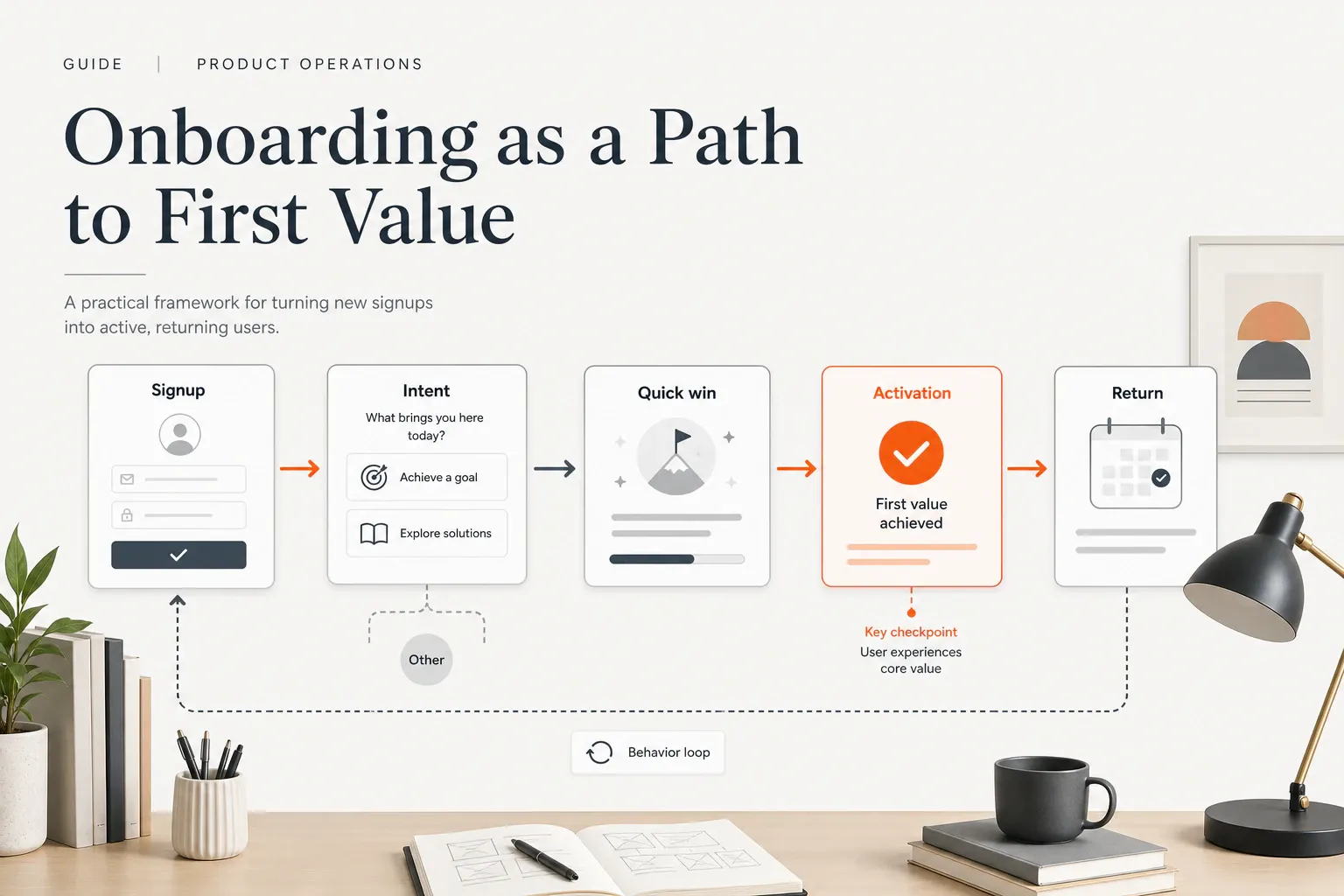
App onboarding is not a welcome carousel, a tooltip tour, or a checklist of setup chores. For an early-stage product team, app onboarding is the system that moves a new user from first interaction to first meaningful value with as little unnecessary friction as possible. That distinction matters because the first few sessions are where confusion, weak value perception, and avoidable setup work quietly turn interest into churn.
What app onboarding is — and what it is not
Nielsen Norman Group defines mobile-app onboarding as the process of getting users familiar with a new interface, often through feature promotion, customization, and instructions. That is a useful baseline, but founders should take it one step further: onboarding is only successful when the user reaches a moment that proves the product can help them.
That means app onboarding is not the same as explaining the interface. It can include education, but it should not be used to compensate for confusing product design. If a screen needs a paragraph of instructions before someone can use it, the better onboarding decision may be to simplify the screen.
Onboarding also does not happen only once. A user may need onboarding at first launch, after signup, when they try a new feature, when they return after inactivity, or when their goal changes. Treat onboarding as a lifecycle of useful guidance, not a one-time gate before the “real” product begins.
Why onboarding matters most in the first few sessions
Early app retention is hard. Adjust reports that global app retention across platforms and verticals falls to 26% on day 1, 13% by day 7, and about 7% by day 30. Those numbers vary by category, platform, region, and acquisition quality, so they should not become universal targets. They do show why early confusion is expensive.
Business of Apps reports that the global app market had an 8.4% activation rate in 2024, citing Airship’s Mobile Lifestyle Benchmarks: Activation report. Again, benchmarks differ by category, but the broader lesson is clear: getting a download, signup, or first session is not the same as getting an activated user.
For founders, onboarding matters because it is the first product-led proof point. It reduces uncertainty, shows value quickly, captures intent signals, and gives you a way to follow up based on what the user actually tried to do.
Start with the activation event, not the screens
The most common onboarding mistake is starting with screens: welcome screen, role question, tour, checklist, permission prompt, dashboard. That sequence may look organized, but it can still miss the only question that matters: what behavior proves the user experienced value?
Use this sentence before designing anything: A new user is activated when they __ because it proves __.
For example:
- A habit app user is activated when they complete their first logged habit because it proves they can turn intention into a tracked routine.
- A collaboration app user is activated when they invite one teammate and share the first workspace because it proves the product can support a real team workflow.
- A marketplace user is activated when they save or contact the first relevant provider because it proves the app helped them move from browsing to intent.
RevenueCat argues that activation metrics based on signups, onboarding completion, or raw engagement often fail to predict retention or revenue. The better metric is whether users reach early value milestones that matter for your product. So choose one primary activation event and one activation window before you choose the onboarding pattern.
Map the shortest path to first value
Once the activation event is clear, list every step between first interaction and first value. Include the obvious product steps and the hidden operational ones: create account, verify email, grant permission, answer questions, choose preferences, connect data, invite teammate, watch tutorial, complete profile, import content, start trial, and perform the first useful action.
Then mark each step as one of three types:
- Required now: the user cannot experience value without it.
- Useful later: the step improves the experience but can wait.
- Removable: the step exists because the team wants information, not because the user needs it.
Android Developers recommends separating what must happen before app use from what can happen in-app, and showing the app’s value before asking for device permissions or account creation. That is especially useful for early-stage teams because every upfront request consumes trust before the product has earned it.
A practical rule: delay permissions, profile details, payment information, and long setup until the user understands the value exchange. If the request is necessary, explain what will happen, why it matters, and what the user gets next.
Choose the right onboarding pattern for the product
There is no single best onboarding flow. The right pattern depends on product complexity, user intent, and how quickly someone can experience value.
Quickstart onboarding
Quickstart onboarding works when the product has one obvious job and users can learn by doing. The goal is to get them into a meaningful action fast. Use it for simple utilities, focused consumer apps, lightweight creator tools, and products where the first value moment is self-evident.
Self-select or goal-based onboarding
Self-select onboarding works when users arrive with different jobs to be done. Ask a small number of questions about role, goal, stage, use case, urgency, or current blocker. Only ask when the answer changes the next screen, default state, recommendation, or follow-up.
Interactive onboarding
Interactive onboarding works when the user needs to do something to understand the product. Instead of explaining the product with slides, guide the user through a real or sample action. This is useful for tools where value appears through creation, configuration, collaboration, or analysis.
Checklist-led activation
Checklists work when activation requires several steps across more than one session. But the checklist should not mirror your internal setup menu. Each item should represent progress toward value, not administrative completion. “Create your first project” is stronger than “Complete your profile” unless profile completion is actually tied to activation.
Use branching to make onboarding feel relevant
Branching is most useful when new users differ in meaningful ways. A founder, a marketer, and a product operator may all sign up for the same app, but they may need different examples, first actions, and follow-up. A fixed tour forces them into the same path. A branched onboarding flow uses intent to make the next step more relevant.
Good branching questions are practical and few:
- What are you trying to accomplish first?
- What best describes your role?
- What stage are you in?
- What are you replacing or improving?
- What is blocking you right now?
The test is simple: if the answer does not change the path, do not ask the question during onboarding. Save it for later research or progressive profiling.
This is where structured product journeys can help. FounderHQ product journeys support quizzes, waitlists, and onboarding flows with branching steps; answers can land on contacts as attributes for later segmentation, and journeys can be shared as hosted experiences or embedded. For an early-stage team, that makes onboarding less like a static form and more like a reusable activation asset.
Design the first-run flow around one quick win
The first-run experience should help the user do something meaningful, not merely read about what the product can do. A quick win is not always the full activation event, but it should create momentum toward it.
Use one of these quick-win devices when the blank page is the problem:
- Sample content: show a realistic finished state before the user creates their own.
- Templates: let users start from a proven structure instead of an empty screen.
- Guided examples: walk users through one meaningful action with context.
- Prefilled states: reduce setup so users can edit, choose, or confirm instead of inventing everything.
Microcopy matters here. Every onboarding step should answer three questions in plain language: what will happen, why it matters, and what to do next. For example: “Choose your main goal so we can start you with the right setup” is stronger than “Personalize your experience.”
Extend onboarding beyond the first session
Many products cannot fully activate a user in one session. B2B, collaborative, configuration-heavy, subscription, and habit-based products often require repeat visits before the user experiences core value. If your product needs more than one session, design onboarding as a sequence of moments rather than a single first-run flow.
That sequence may include in-app nudges, lifecycle emails, push notifications, SMS, founder follow-up, or sales-assisted help, depending on the product and the user’s consent. The point is not to automate more messages. The point is to continue the path to value when the user leaves before finishing.
FounderHQ’s homepage describes Sequences as supporting email, SMS, WhatsApp, and push through connected providers such as Resend, SES, Postmark, or Twilio. For teams already using journey answers as contact attributes, that kind of follow-up can connect onboarding intent to later activation nudges without treating every signup the same.
Measure onboarding by behavior change
Onboarding analytics should answer one question: did the flow change user behavior in the direction of value? Completion rate is useful, but it is not enough. A user can finish every screen and still never experience the product’s core benefit.
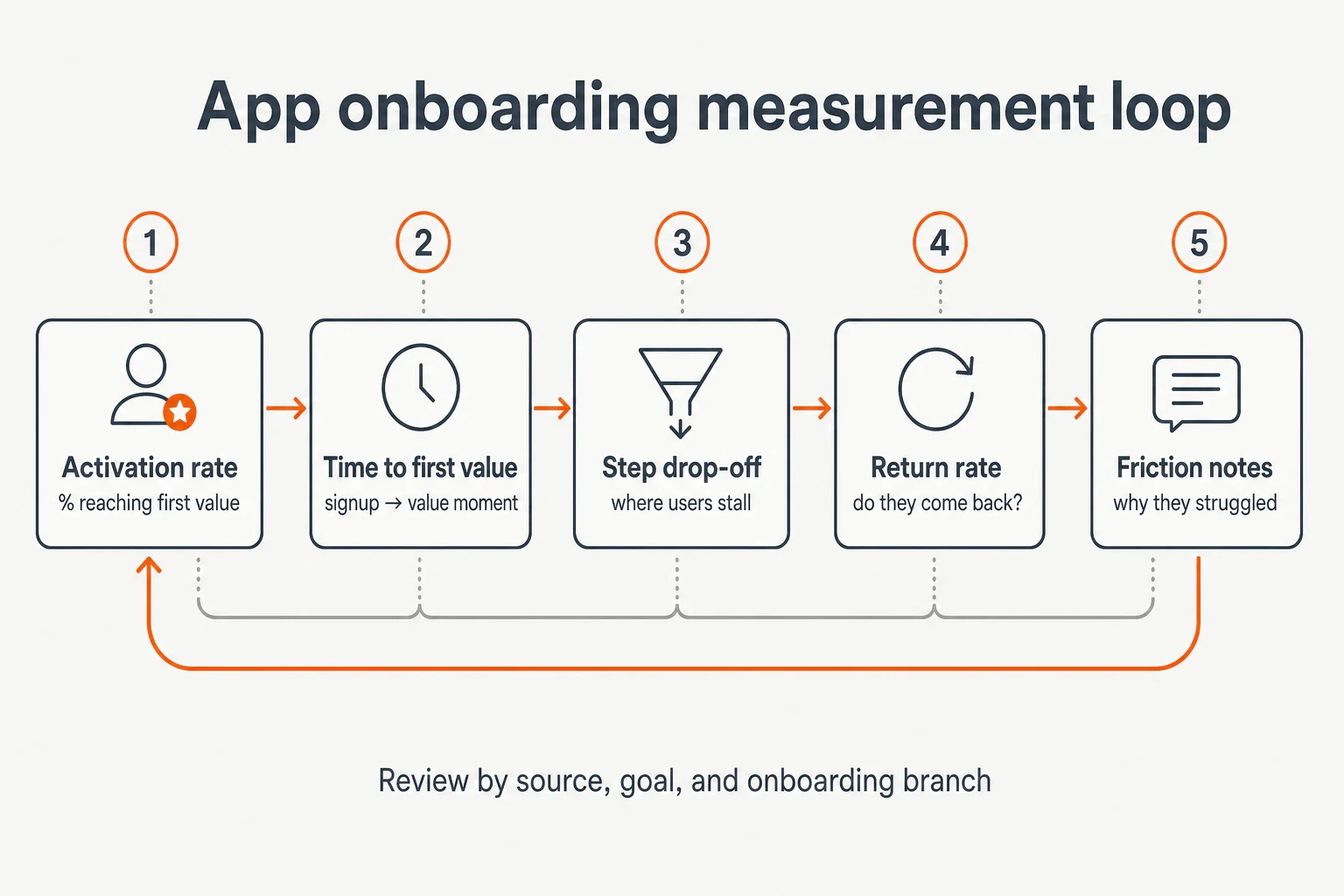
Use a lean measurement set:
- Activation rate: the percentage of new users who reach the defined first-value event.
- Time to first value: how long it takes from signup or first launch to that event.
- Step-level drop-off: where users stall, quit, or loop.
- Return rate: whether users come back after the first value moment.
- Qualitative friction notes: what confused users, what they expected, and what they were trying to do.
Review these metrics by cohort, not just as one blended average. Segment by acquisition source, user goal, role, device, plan type, and onboarding branch. A weak average may hide one branch that works and another that fails.
Use this troubleshooting table when the numbers are unclear:
Symptom | Likely issue | What to inspect |
|---|---|---|
Low onboarding start rate | First screen does not make the value exchange clear | Headline, first action, perceived effort |
High mid-flow drop-off | Too many steps before value | Required-now vs useful-later tasks |
High completion but low activation | Checklist measures chores, not value | Activation event definition |
Slow time to first value | Setup is heavier than the quick win | Templates, sample states, delayed fields |
Low return after activation | First value does not lead to a next habit | Follow-up, next action, reminder logic |
The visual below summarizes the measurement loop: define the behavior, track the time and drop-off, learn why users struggled, and review by the segments that explain the difference.
A 7-step app onboarding checklist founders can use this week
Use this app onboarding checklist when you need a practical improvement pass without turning onboarding into a quarter-long redesign.
- Define the activation event. Complete the sentence: “A new user is activated when they __ because it proves __.”
- Choose the activation window. Decide whether activation should happen in the first session, first day, first week, or later based on product complexity.
- List the current path to first value. Write every screen, field, permission, message, and action the user must pass through.
- Remove or delay nonessential friction. Mark each step required now, useful later, or removable.
- Choose the onboarding pattern. Use quickstart, self-select, interactive onboarding, or checklist-led activation based on the product’s job.
- Add only branching questions that change the path. If the answer does not affect the next step, do not ask it upfront.
- Review drop-off and activation weekly for the first month. Use the first month to learn where users hesitate, not to defend the original flow.
This checklist is intentionally narrow. Early teams do not need a perfect onboarding system before they learn. They need one clear value event, one shorter path, and one review loop they can keep running.
Common app onboarding mistakes to avoid
The fastest way to improve onboarding is often to stop doing the things that feel polished but slow users down.
- Teaching every feature before the user needs it. Users do not need the whole product map; they need the next useful step.
- Using one fixed tour for every user. If users have different goals, a single tour will be too generic for most of them.
- Treating account creation as success. A signup is a starting point, not proof of value.
- Treating permission prompts as onboarding. Permissions are requests for trust. Ask after the user understands why the permission matters.
- Measuring checklist completion as activation. Completion is a diagnostic metric. Activation is a behavior that shows value.
- Copying another app’s screens. Copy the strategic job of a screen only if it matches your product’s value path.
How FounderHQ can fit the workflow without overclaiming
Early-stage product teams often know what they want onboarding to do, but the work gets scattered across forms, docs, product notes, email drafts, and analytics reviews. That is where a focused operating layer can help: not by replacing founder judgment, but by turning onboarding thinking into a structured journey the team can reuse and improve.
FounderHQ is built for early-stage product teams that need to build product journeys, compose founder-led content, and keep company context in one place. For app onboarding work, the relevant capability is practical: Journeys can support quizzes, waitlists, and onboarding flows with branching steps; answers can become contact attributes for later segmentation; and journeys can be hosted or embedded.
That does not guarantee activation, retention, signups, or revenue. It gives founders a cleaner way to turn the onboarding strategy into a guided experience, learn from the answers users give, and keep improving the path to first value.
Conclusion
The best app onboarding flow is not the one with the most polished tour. It is the one that helps the right user reach the right value moment with the fewest unnecessary steps. Start with the activation event, shorten the path, branch only when relevance improves, and measure whether users actually change behavior. For an early-stage team, that is enough to turn onboarding from a launch checklist into a learning system.
Related articles
Application Onboarding Process: Definition, Steps, and When to Use It
A practical seven-step application onboarding process for moving new users from signup to first meaningful value without unnecessary setup or generic tours.
In-App Analytics for Onboarding: Definition, Metrics, and When to Use It
In-app analytics for onboarding turns events, funnels, segments, and user feedback into decisions about the path from signup to first value.
In-App Guidance for Onboarding: Definition, Examples, and When to Use It
In-app guidance helps users complete meaningful tasks inside a product. This guide explains the main patterns and how to match each one to an onboarding blocker.